



Bharat Interface for Money (BHIM) is now available on play store with an updated version – 1.2. BHIM is a different mobile application for doing financial transactions as compared to other mobile wallets such as Paytm, MobiKwik, Oxigen, etc. It also allows sending money to people who don’t have the app. The integration of UPI mechanism via USSD payments helps BHIM to work on feature phones and even do financial transactions in offline mode.
It is the common online platform which uses the mechanism of Unified Payments Interface (UPI) for making simple, easy and quick payment transactions through smartphones.

What makes BHIM different?
Using unified payments interface, you can directly make payments from one bank account to another. In the case of e-wallets, however, you have to add money from your bank account, and then the transfer of payments can be done within the same wallet app. You can also send money through IFSC and MMID Code to users who do not have a UPI-linked bank account or they are still not having the mobile app. You can even create your own QR code for a fixed amount of money, which the merchant can scan to make the payments. Currently, you can transfer up to a limit of Rs.10,000 per transaction and Rs. 25,000 in 24 hours through your bank account. While using a wallet, a person who is a KYC-compliant customer can transfer up to Rs.10000.
You may also watch:
How is a bank registered under BHIM?
Apart from using Aadhaar-based payment option (AEPS), users can pay using either mobile number, virtual payment address or Account +IFSC. Currently, the government has introduced 14 banks to facilitate payments through Aadhaar-pay, and still, there will be more banks which are going to join soon.
Supported banks till date are: Allahabad Bank, Andhra Bank, Axis Bank, Bank of Baroda, Bank of India, Bank of Maharashtra, Canara Bank, Catholic Syrian Bank, Central Bank of India, DCB Bank, Dena Bank, Federal Bank, HDFC Bank, ICICI Bank, IDBI Bank, IDFC Bank, Indian Bank, Indian Overseas Bank, IndusInd Bank, Karnataka Bank, Karur Vysya Bank, Kotak Mahindra Bank, Oriental Bank of Commerce, Punjab National Bank, RBL Bank, South Indian Bank, Standard Chartered Bank, State Bank of India, Syndicate Bank, Union Bank of India, United Bank of India, and Vijaya Bank.
You cannot link any of your bank accounts with mobile wallets. You can only transfer money to your wallet using the various medium like a credit card, net banking, etc.
Does BHIM incur any transactional cost?
There are no charges for making the transaction through Bharat Interface for Money. But your bank might, however, levy a nominal charge as per the UPI or IMPS transfer fee. Through wallets also, no charges are applied while adding and transferring money to someone but charges are applicable when you transfer your money to a bank account via e-wallet.
You may also watch:
Do you need internet connectivity?
You are required to have an internet access, an Indian bank account that supports UPI payments and a mobile number linked to the bank account. However, the integration of UPI mechanism via USSD payments helps BHIM to work easily on feature phones as well where you can even do financial transactions in offline mode. You can do offline payments through wallets also via dialling a toll-free number but this facility is not available in all kind of wallet categories. While using wallets, you are likely to have internet facility in your smartphone.
How does the BHIM app work?
After the successful installation, BHIM verifies your mobile number, lets you choose your preferred bank which gets registered for making payments. You receive an SMS for verification and authentication while selecting the bank as mobile number plays an important role in transferring money. Therefore always use the mobile number which is linked to your bank account. BHIM will then ask you to create a 4-digit mPIN. UPI activated account reflects the number by its own.
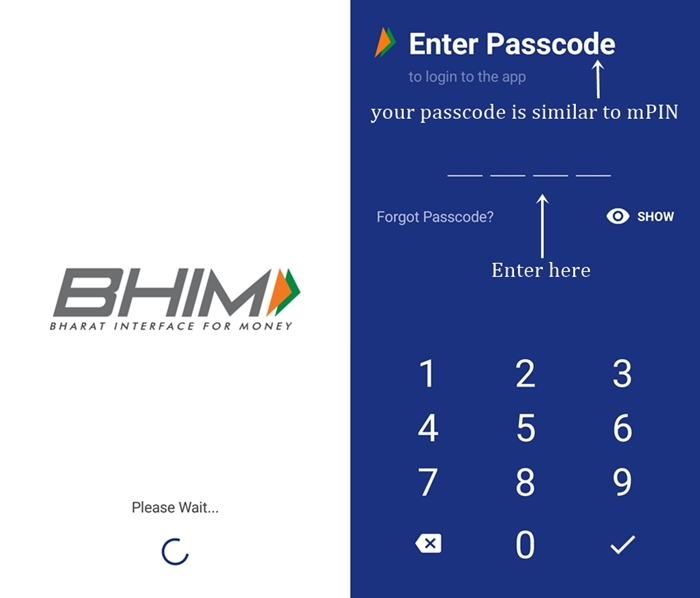
To send or request for money, you need to type in the mobile number or VPA address. Type in the amount, and process it for making payments. For any notification, you can click on the bell reflecting in the above bar of the app.
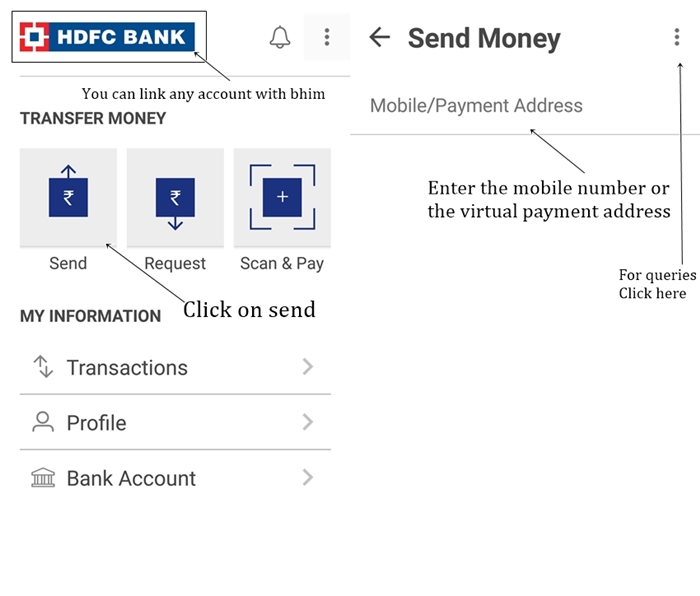
This way you need not fill your bank account details again and again. Moreover, you need not tell your account number to anyone, unlike wallets where you need to add money from your net banking or from credit or debit card mentioning the details.
You may also watch:
Conclusion:
It is difficult to say that BHIM will replace e-wallets because the usage of technology depends on customers only. People are getting used to with e-wallets while BHIM too has made a good penetration in the market. The government is promoting cashless transaction irrespective of the medium you choose to make online payments. But it is for sure, that if you have a variety of financial apps, technology won’t be a constraint for you as you can easily switch yourself from one medium to another.