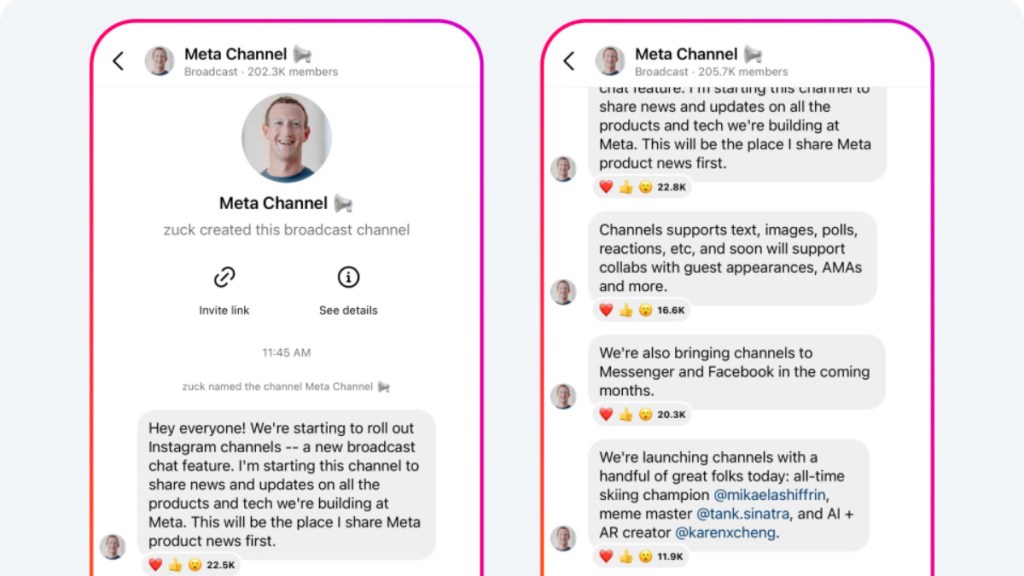
The latest in a series of Meta apps to take inspiration from other platforms, the Zuckerberg-owned company has announced its own version of Telegram channels called Instagram channels. The new feature, which was announced by Mark Zuckerberg on Thursday, is currently only available on the mobile app and is described by the company as a broadcast chat feature for sharing news and updates related to all products built at Meta. It supports various media formats such as text, images, polls, reactions and more, with plans to introduce support for collabs with guest appearances, AMAs and more to the platform in the coming months.
The new Instagram channels are being offered as a communication channel for content creators to share their latest updates with followers using text, photos, videos, voice notes, polls and more. Currently being tested with a select group of creators, including Austin Sprinz, Chloe Kim, David Allen, Gilbert Burns, and more, the new feature is expected to see more guest collaborations in the coming months.
So how does the broadcast work? Once a creator gains access to broadcast channels and sends the first message from their Instagram inbox, their followers will receive a one-time notification to join the channel. Although anyone can discover the broadcast channel and view its content, only followers who join the channel will receive notifications whenever there are updates. Followers have the option to leave or mute the broadcast channel at any time and can control their notifications from creators by going to a creator’s profile, tapping the bell icon, and selecting “broadcast channel.”
By default, notifications will be set to “some,” but this setting can be changed to “all” or “none.” Apart from the invitation notification, followers will not receive any other notifications about a broadcast channel unless they add the channel to their inbox. Once a channel is added to their inbox, it will appear among other message threads, and notifications will function like any other chat.
As soon as the broadcast channel goes live, creators can also encourage their followers to join by using the “join channel” sticker in Stories or by pinning the channel link to their profile. To join the broadcast channel, followers need to tap “Join broadcast channel” given in the broadcast channel link. Once they have joined, followers can react to content and vote in polls, but they won’t be able to send messages.
ALSO READ l Apple iOS 16.4 developer beta introduces fresh emoji, web app notifications, and other features