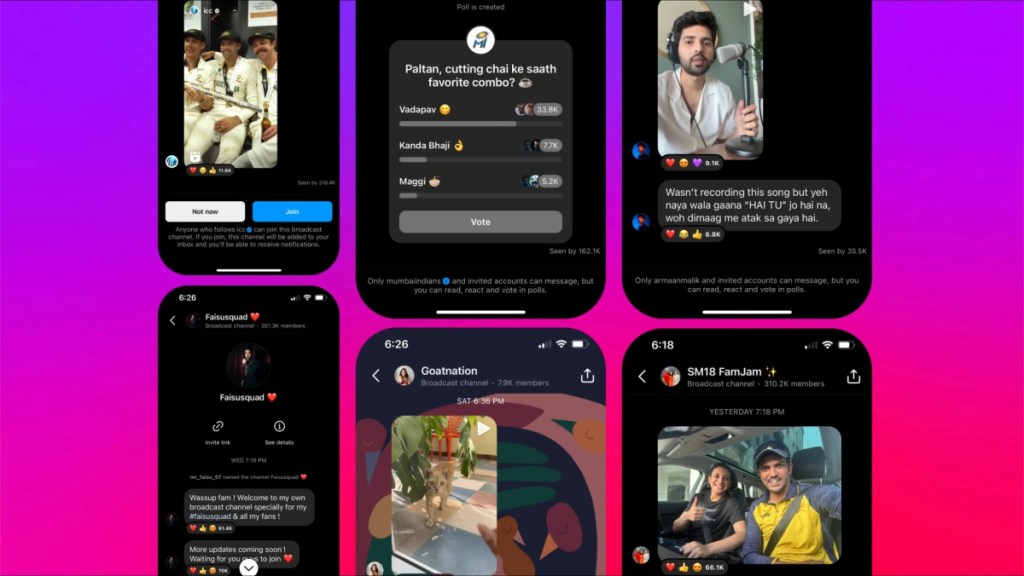
Recently, the introduction of WhatsApp Channels for some beta users made a buzz, but until then, Instagram broadcast Channels were not available for everyone. However, this new feature of Instagram has finally arrived in India. According to a blog post in Meta’s newsroom, it claims to give millions of creators a new way to engage with their followers. This feature is here to aid the creators grow their connections with their followers.
Also Read: Did WhatsApp copy Telegram by introducing Channels?
Broadcast Channel debuts in India
The testing of this feature started back in February. This is a medium that facilitates one-to-many messages. The creators will be able to share their messages with their followers, but conversely, the followers will not be able to respond to them. The creators can post polls, share voice notes, and share text, videos, and images. All this would let the creators share some behind-the-scenes footage or sneak peaks with their followers. However, the followers will only be able to react to the messages or vote in the posted polls.
How to use Broadcast Channels?
As and when the creators get access to the Broadcast Channels and send out their first message through Instagram’s Direct Message (DM), the followers will receive a notification to join the channel. Anyone who follows the creator will be able to discover the Broadcast Channel and view its content. However, only the followers who decide to join the Broadcast Channel will get notified whenever the creator sends out an update.
Further, Instagram will provide the followers with the option to mute or leave the Broadcast Channel as and when they wish. Moreover, a follower will also be able to control the notifications. All one has to do is go to the creator’s profile, tap on the bell icon, and then select “Broadcast Channel.”
What’s more, under the bell icon, the follower will be able to control all the notifications that they receive in regards to the creator. If they wish to receive notifications for posts, stories, videos, reels, live videos, or Broadcast Channels, they can do so from the bell icon. Notifications may show “some,” largely for live videos. The user can change it by tapping on the option and selecting if they wish to receive all, some, or none of the notifications.
Besides the invitation notification, the followers will not receive any other notifications unless they add the Channel to their DM. When the user adds a channel to their inbox, it will appear along with other conversations. It will basically function like any other chat, where the user will receive the notification like they do for other chats.
An added feature for creators is that they will be able to share a “join channel” sticker on their stories to encourage their followers to join in. They can also pin the link to their profiles.
Join Broadcast Channels
If you are an existing follower of a creator and they start a broadcast channel, you will receive a one-time invitation to join it. You can also press on the sticker or the link in their profile to join the channel. If one presses “Join Broadcast Channel,” they will be pressed to follow that creator. Once you join the Channel, you can react or vote in the polls. The followers can also share the link to joining the Broadcast Channel and following the creator with their friends.
What’s More?
There is a feature called “Collaborators” that will allow the creators to invite other creators or perhaps fans to take part in the Broadcast Channel. From an expert interview to a casual conversation, the followers will be able to keep tabs on the exchange between the creators and their special guests. This feature is available in India.
The option for creators to use question prompts to gather input and responses from followers is one of the new features Instagram is still exploring. Another is a dedicated channels tab in the inbox, which will make it simple for users to access the channels they have subscribed to and find new ones. These are currently being tested and are not yet accessible in India.
Furthermore, Instagram is investigating new controls to aid creators in managing and promoting their Broadcast Channels, including the ability to add an expiration date and time, add a moderator to help manage users, messages, and content, and share a link or even a sneak peek to Stories to entice followers to join.
Also Read: Instagram’s Twitter clone leaks in full glory and here is what it looks like
When it comes to privacy and safety, Instagram’s Community Guidelines apply to Broadcast Channels so that users can join them in safety and comfort. Both the Broadcast Channel itself and certain content posted in the channel can be reported. If the content is found to violate Instagram’s regulations, it will be removed.