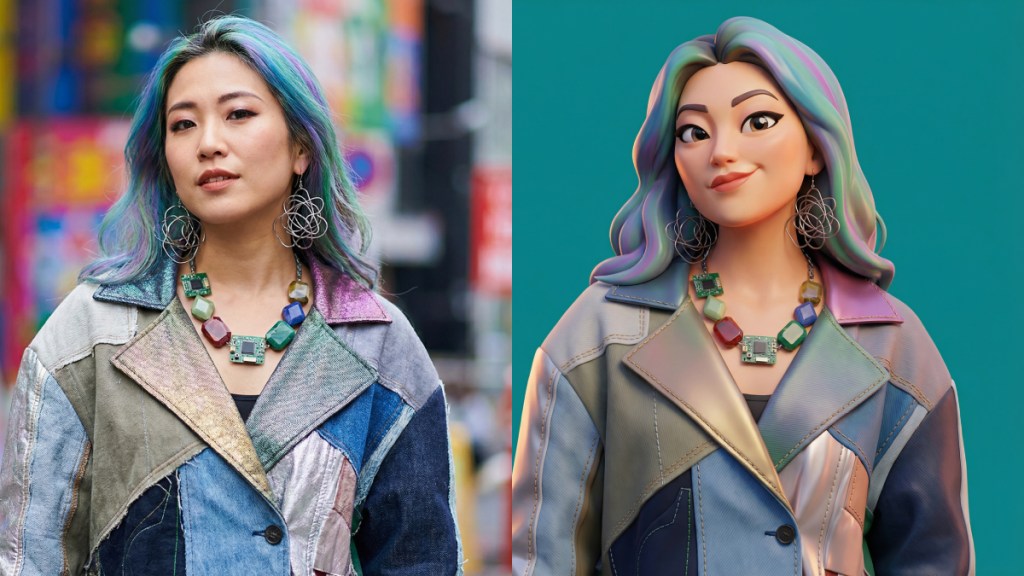
As part of the Google Gemini Nano Banana trend, a new prompt has gone viral, encouraging users to create stylised versions of their favourite portraits and photos. Unlike the realistic image trends from the previous versions, the new AI art trend is sweeping social media, wanting users to transform their regular photos into polished 3D caricature portraits. This effect is achieved using Gemini 3’s Nano Banana Pro model and a very specific prompt that directs the AI’s image generation.
For those unaware, the Nano Banana Pro model was released a few weeks ago as a more advanced version of the Nano Banana 2.5 Flash model. Google says that the new model is capable of generating more realistic images with more complex and better visual effects. Nano Banana Pro is available via the Gemini app on iOS and Android, as well as the Google AI Studio utility on PC.
Here is a step-by-step guide on how to join the trend and create your own viral 3D caricature via Google Gemini:
Step 1: Access the Gemini image generator
You will need access to Google’s Gemini large language model (LLM), which includes an image generation feature powered by the latest model, Gemini 3 Pro.
1. Navigate to the Gemini interface on your web browser or through the official app.
2. Check that your version of Gemini supports uploading an image as a source for your prompt. The viral portraits work by having the AI model base the caricature on your uploaded photo.
Step 2: Upload your photo
Upload the image you want to transform into a 3D caricature. Choose a clear photograph, ideally one with good lighting and a simple background, where your facial features are clearly visible. The Gemini model will use this image as a reference for the final cartoon portrait.
Step 3: Use the viral prompt formula
The key to achieving the distinctive, polished 3D aesthetic lies in using the precise prompt that went viral. Copy and paste the core prompt into the chat box after uploading your photo:
Nano Banana Pro: The core prompt
“A highly stylised 3D caricature of the person in the uploaded image, with expressive facial features, and playful exaggeration. Rendered in a smooth, polished style with clean materials and soft ambient lighting. Bold colour background to emphasise the character’s charm and presence.”
Step 4: Customise and generate
While the core prompt provides the necessary style instructions, you can further personalise the image by adding specific details to the beginning of the prompt:
– You can ask the AI to highlight certain elements or include specific attire. For example, “A highly stylised 3D caricature of a man with a red beanie and a graphic t-shirt…”
– You can change the background colour or add a simple setting. For example, “…Bold colour background to emphasise the character’s charm and presence, using a vibrant teal background.”
Once your prompt is final, send the request to Gemini and wait for the image generation to complete.