
A new phishing scam on Gmail is so compelling, that even computer experts have been left confused. This new form of attack on the email website gets information from the texts that you have sent or received and then sends them to your contacts. The hackers use this technique to get access to your passwords. This method is being considered unique as it convinces the user to enter their login credentials which the hackers later use to read your emails.
This new technique of attack was initially found by security researchers at WordFence, which is a famous security tools developer, and according to a blog written by CEO of WordFence, Mark Maunder, this is a very effective phishing scam as the hackers log into the user accounts as soon as they enter their details, and then they send actual texts and attachments from that account to the people in the contact list, thereby extending the chain in the scam.
In the email, you can see a picture of the attachment and once you click on ‘preview’, opens a new tab which asks you to enter your sign in credentials for Gmail. When you look at the address bar, once the link opens, you will notice that it starts with ‘data:text/html’, prior to the Gmail website address. Many people ignore it, as they find it to be genuine, and get mired into the scam. Interestingly, whenever there is a website link with bad content, the browser generally warns you of it being malicious, but this link gets no such warning.
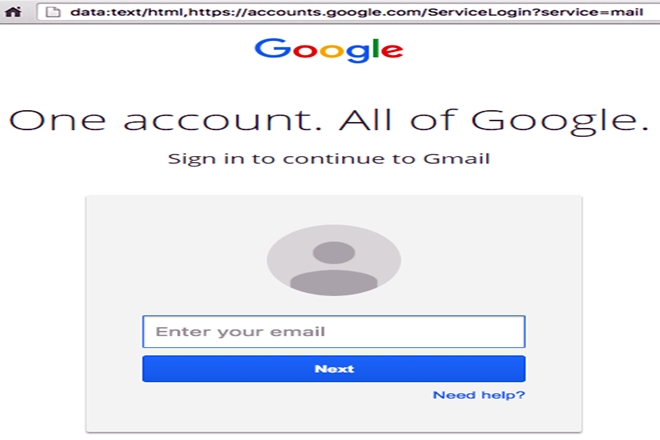
What makes the scam worse is the fact that you see the mail come from the people in your contact list, who you usually trust. The hackers after entering your id through them, go on to collect personal information to use them for secondary attacks, which means other websites where you use Gmail to log in. WordFence, in its blog also said that as of now it has been found only in Gmail, but it could possibly be across many other websites.
[jwplayer HQLeigOu-DE6UeepY]

You need to be very careful before, falling for such scams. Just check the address bar once, before entering your details. If the website address starts with HTTPS:// then you are fine, as the ‘S’ stands for ‘secure’. As of now, you can check the website “https://haveibeenpwned.com/” to check if your ID has been compromised, but just to be secure, change your passwords immediately.