
Samsung has always tried to stay ahead of the competition with its flagship devices that debut twice in a year. The difference between both the devices is the ‘mighty’ S Pen and a little bigger display with so many bells and whistles put in together to contest some of the biggest rivals. This year we have Galaxy Note 9, which is the successor to the Galaxy Note 8, that comes with nearly identical specifications as the Galaxy S9 Plus that was released earlier this year. However, a lot is riding on what is the centrepiece of the Galaxy Note 9 – the S Pen.
The Samsung S Pen is entirely new yet old as it is accompanied by some old functions. The Samsung Galaxy Note 9 has the biggest display ever seen on a Samsung phone. It has the most capacious battery ever found on a flagship Galaxy device. And moreover, it has diminutively upgraded cameras. At the price starting at Rs 67,900, the Galaxy Note 9 seeks to stay distinctly gnarly in the crowd of notches that the industry is immensely obsessed with. But is that enough for Galaxy Note 9 to stand the test of time, especially when its premium price could attract a few buyers in India? Let’s find out.
Samsung Galaxy Note 9 Design, Display, and Hardware
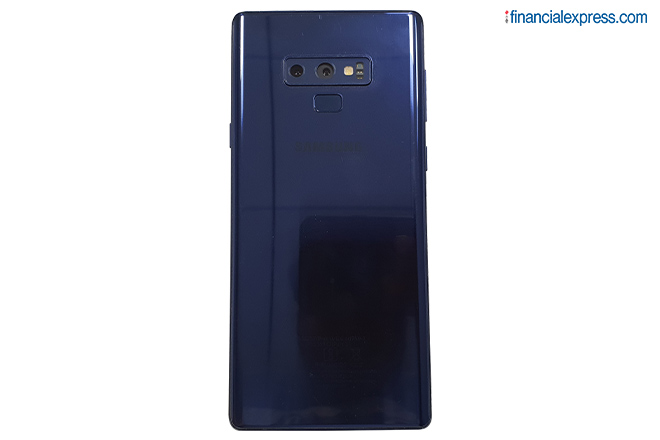
The Samsung Galaxy Note 9 is a thoroughly crafted piece of glass and metal that can allure you in the plain sight. The unit we received is draped in the Ocean Blue colour, which is the only colour variant to accompany the yellow-coloured S Pen variant. The S Pen models on other variants come in the colours similar and corresponding to that of their respective Note 9 devices. The metal and glass seem to have married each other so perfectly, you will be fascinated. But despite Samsung’s efforts in cajoling buyers, the unruly size of the phone is an undeniable concern.
There is a massive 6.4-inch display crammed into a big slab that indeed feels unwieldy. Thanks to its 201-gram weight, Galaxy Note 9 isn’t the lightest flagship device available in the market. While this may sound like a quibble to some, its regular use should make you realise how big of a phone it is, especially when you are watching videos, or texting someone over a prolonged period. The corners are chamfered on the four edges with rounded carvings. While this design sets the Galaxy Note 9 apart in looks from the Galaxy S9 Plus, it begins to prod your palm while holding for a longer time.
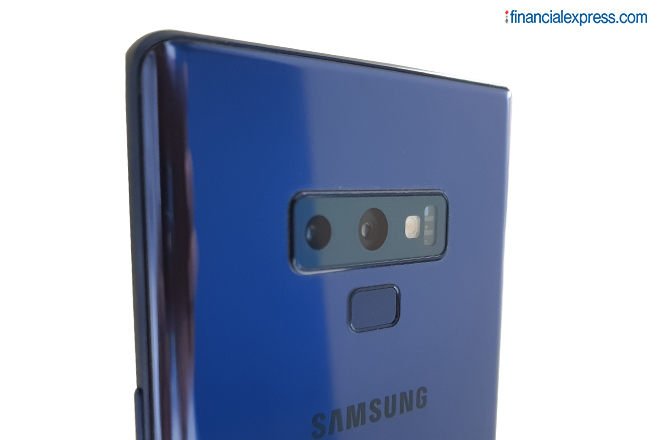
The glass finish at the back isn’t slippery, which means you don’t have to worry about dropping it while holding the phone lousily sometimes. That said, it is a magnet for the fingerprints, which is why you might consider buying a protective case. The cameras are on the upper part, a little protruded, and now stylised in a horizontal manner, which is a nice shift to give a new look to the Galaxy Note 9. The camera island is bordered by a slightly taller wall that protects the camera glass against the scrapes. However, we are reminded of how some use cases were never enough for Samsung to fix the placement of the fingerprint sensor. The odd position of the fingerprint sensor adds up to the little bothering that requires more than one, sometimes two tries to successfully unlock the phone.
While the Galaxy Note 9 looks admirably good and premium, it’s not something we haven’t seen before. There is hardly anything new to the surface beauty of Galaxy Note 9 when you place the Galaxy Note 8 next to it. Samsung set a really high benchmark for how its flagship devices are going to look, only to be stuck in the karmic wheel of repetition.
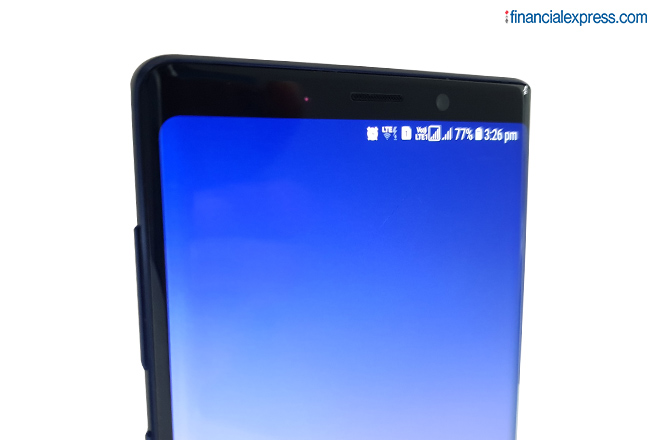
We have talked about the back, let’s dive into what the display brings to the table. There is a 6.4-inch Quad-HD+ Super AMOLED Infinity Display on the Galaxy Note 9 – just 0.1-inch taller than Galaxy Note 8’s display. Samsung says it’s the biggest display to have ever been given in a Galaxy phone. We agree but with an asterisk. This big a display can fit into your palms only if they are broad and tall enough, or you have found yourself fondly in favour of tablets for a long time. We often found it hard to reach the top corners without having to slip the phone a little down the palm, which is sometimes annoying. Nonetheless, the display stands out in the crowd of the ones seen on the rivals. Samsung has always managed to aggrandise its status as a premium smartphone seller when the display of its flagship device is on the showcase.
Watching movies on this huge display is when you feel you spent the money at a right place. The colours are punchy yet subtle with noticeable variations in the shades. The best thing about AMOLED display is the reproduction of deep colours. For example, the display goes pure black when there is a scene showing dark places. Besides, the primary colours come out with good vibrancy that you would enjoy thoroughly, not only while consuming watchable media but also generally. However, the curved edges are sorely reflective that is a turnoff. It also hides some important elements, for instance, the top and bottom bars in PUBG.
Samsung is still banking on its reluctance to jump the bandwagon and cut the notch out of the display like everybody else is doing. But it’s sort of good as we get to see some individuality in the crowd full of notches. While you do get deprived of making the use of your smartphone’s frontal dimension to the fullest, it’s really minuscule to criticise.
Under the hood, the Galaxy Note 9 comes with an Exynos 9810 SoC paired with 6GB or 8GB of RAM options. For the first time, Samsung introduced an enormously capacious 512GB storage variant, besides the 128GB storage version. The storage can be expanded using a microSD card of up to 512GB, which means a total storage of 1TB can be availed on the Galaxy Note 9. The top edge of the device houses the SIM tray, which is hybrid meaning you can either insert two SIM cards or one SIM card + microSD card at once.
The left edge of the Galaxy Note 9 has volume rockers and perhaps the inevitable Bixby button. With Bixby 2.0 this year, a lot still remains the same – we caught ourselves inadvertently hitting the Bixby button and get really annoyed. Hopefully, Samsung realised this menace and has promised an update that will curb a single Bixby button press to trigger it and you will need to do that twice if you want to activate Bixby on the device. However, it is worth pointing out that the placement of the Bixby button is most adequate, while other buttons require you to get into some practice.
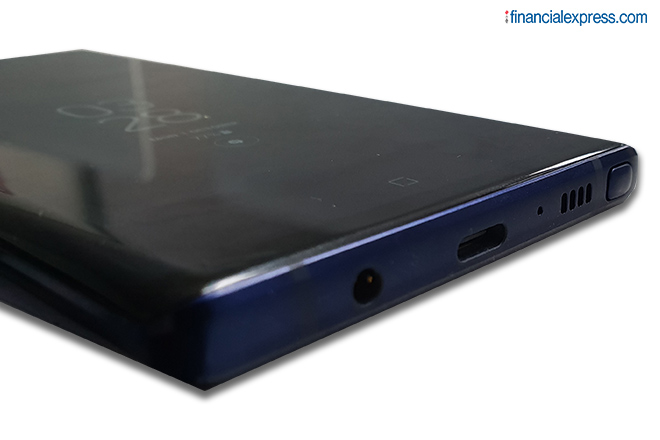
The bottom stripe on the smartphone has the USB Type-C port, 3.5mm headphone jack, and the speaker grille. Samsung should be praised for not having killed the 3.5mm audio jack on its premium segment, unlike Apple and now OnePlus, which is speculated to forgo it on the upcoming OnePlus 6T. Also at the bottom is the silo that houses the S Pen. S Pen is something that’s inseparable from the Note series and this year, Samsung has loaded S Pen with multiple functions, however, their applicability is justified or not remains to be seen.
The Ocean Blue Galaxy Note 9 unit we got comes with the yellow-coloured S Pen that has a golden tip, which is just there to add to the beauty of the phone. Taking the S Pen out requires a moderate press on the tip, after which the tip springs out for you to pull. We noticed that you may need to use your fingernails to take it out. On taking out the S Pen, a yellow blob appears and disappears on the right-hand bottom, just above the silo’s location. It’s nothing but an animation to make your S Pen experience richer. You can even set sound effects to the docking and undocking of the S Pen.
S Pen now comes with remote control functionality, which means that you operate a handful of things without having to hold the Galaxy Note 9 in your hand. The best use case is taking group selfies or photos that require you to place the device at some distance while you stand with the group holding the S Pen in your hand and clicking the button to take the photo. You can even navigate through multiple PowerPoint slides from a distance, which is one way to offer enhanced productivity. Samsung has offered a single button on the S Pen, so you can either click or double-click, both of which have a set of operations depending on the app they are being used for.
For example, using the S Pen in Chrome browser will open the next page on a single click and the previous page on double click. Similarly, single click plays/pauses videos and music while double click skips the song and plays the next one in the queue. YouTube app is supported for apps, besides the native video player. Mostly all music apps support the functionality of play, pause, and skip. The S Pen is customisable, which means you can change the default settings to perform the desired task. By default, the S Pen opens the magnifier on long press, but you can go to S Pen settings to change it take up one of the many S Pen features (Create Note, Live Message, Glance) or open an app.
The S Pen uses Bluetooth LE (Low Energy) to stay in touch with the device, even when the Bluetooth on the latter isn’t actively turned on. Bluetooth Low Energy also makes sure that S Pen doesn’t suck much of the juice. With a supercapacitor fitted inside, the S Pen takes about 40 seconds to charge completely when it’s inside the device and can last up to around 35 minutes on a single charge. This partially defies its applicability as a remote control for a prolonged time. You will need to tuck the S Pen back into the device every 30 minutes or so, which will be duly conveyed to you by the battery indicator on the display status bar.
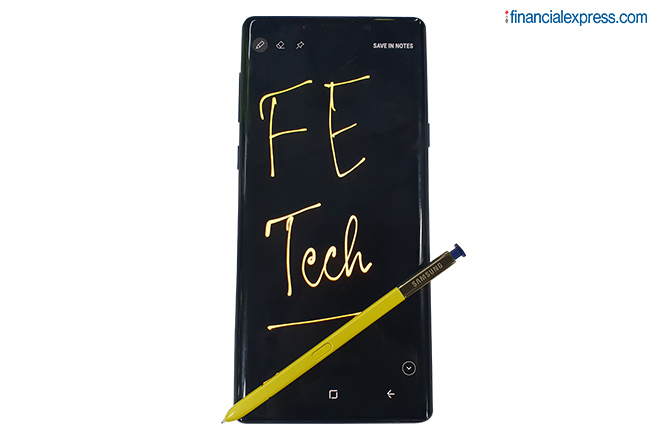
Using S Pen is buttery smooth on the Galaxy Note 9, so much so that we sometimes didn’t feel the need of keeping an actual pen should there’s anything worth scribbling or jotting down. Anyway, the first thing that you may actually do after taking out the S Pen is writing with it on the screen. The moment you unclasp the S Pen, the inactive screen becomes a canvas for you to begin scribbling, drawing, and writing. It’s called the Air Command Functionality. The S Pen writes in yellow ink, which is strikingly contrasting with the black slate. However, when you save whatever you have written in yellow ink to Samsung Notes, the black background turns white, making it really hard to read.
Apart from this, there are hardly any changes to the functionality of S Pen. You can screenshot anything on the screen and annotate it, translate text to any languages (supported by Bixby), send Live Messages, which is essentially creating a GIF (or MP4) out of your scribble using different style strokes and backgrounds. You can even add AR Emoji and doodle on it. If you have the S Pen taken out, the text fields will pop-up the keyboard with the writing screen instead of the QWERTY keypad – of course, you can interchange it.
Samsung Galaxy Note 9 Camera
Samsung is usually in the run for the best cameras in a smartphone vying for the top position among Apple, Google, and Huawei. The Galaxy Note 9 cameras haven’t changed since the Galaxy S9+, which means the camera setups are identical on both the flagships. The Galaxy S9+ cameras are still one of the best in the industry and Samsung is carrying this accolade forward to the Galaxy Note 9. There are two 12-megapixel Dual Pixel sensors that work in synergy using the variable-aperture technology to tweak the apertures according to the light available on the subject.
The aperture range is f/1.5 to f/2.4 on the primary camera that either the device automatically adjusts or you can manually change. While the former is suitable for the low-light conditions, the latter is commonly in use to take normal lighting photos. The primary camera is optically stabilised (OIS), which means there won’t be jittery videos and images while the secondary camera comes with 2x optical zoom on top of OIS to produce sharp images even when you are standing far from the subject.
The images taken during the daytime turned out punchy, sharp, and well-detailed. You can literally zoom the image and still notice minutest features, textures, and objects in the image. The images look good even on the big screen, thanks to the high resolution. In low-light, cameras suffer a little and cannot really produce the photos as outstandingly detailed as the ones taken in the day. However, the images are clear and should be good enough to be printed, much less posted on social media. The focus lock is instant and there is no shutter lag, whatsoever.
The Live Focus mode is the name Samsung has given the Bokeh effect on the Galaxy lineup. Even though almost every OEM is in a cut-throat competition to emulate the Bokeh setup in a photo, none of them has really reached that vantage point. The images in Live Focus are colourful and vibrant, however, there is an overtone of smoothness. The subject is brought into focus well, however, in doing so, some tidbits plunge into the defocused background. Overall, the Bokeh photos are at par with the industry and you would like them.
The cameras come with slow-motion videos in the setting called Super Slo-Mo Mode. The videos can be slowed down for as high as 960fps in 720p resolution. We found the videos impressive, however, it suffers in low light, which means you cannot take slo-mo videos in inadequately lit places. The OIS worked incredibly well – we could not notice shakes in videos. You can record UHD (4K) resolution videos on Galaxy Note 9, however, it comes with a time constraint of 5 minutes in 60fps and 10 minutes in 30fps. There is Hyperlapse that you can tinker with to record timelapse videos in up to 32x speed.
This time around, Samsung has introduced what it likes to call Scene Optimiser in the camera app, which only works with the rear cameras. What it essentially does is “automatically adjust the colour settings” of the photos to match with what you have locked as a subject. For example, when you are taking a photo of your pet, the Galaxy Note 9 cameras will detect an animal and adjust the lighting so as to produce a better version of the image that you may have clicked otherwise without the Scene Optimiser. We found this feature really handy and impressive, especially while clicking landscapes and photos that require a perfectly adjusted HDR.
The front camera on the Galaxy Note 9 is an 8-megapixel shooter with a f/1.7 aperture. The selfies are exceptionally detailed and impressive. Live Focus works just fine for selfies and there are no complaints here. The selfies are good to go on social media platforms if that’s what you intend with the selfies. The Beautification mode is icing on the cake, however, overdoing the tweaks on selfies may result in unnatural photos. The videos are of good quality on the front camera.
The camera app has AR Emoji that lets you create your own personal animated emojis. We haven’t really found enough use for AR Emoji in the chat apps, if we, for once, forget how grotesque the AR Emojis look. While the implementation of AR Emoji is on par, the character generated often makes us question its existence. Apple introduced Memoji on iOS 12 this year. Apple’s animated emoji miming you is kind of cute, which you will love to send in a chat.
Here are the camera samples:




Samsung Galaxy Note 9 Performance, Battery
Samsung launches the India models of its smartphones with its own in-house Exynos processors. Not only the Exynos processor has been found to give a neck and neck competition to its Qualcomm counterpart. The Samsung Galaxy Note 9 is powered by an octa-core Exynos 9810 chipset with up to 8GB of RAM and a mammoth 512GB eMMC card embedded under the hood. This is the most spacious smartphone that you can get in the Samsung line, however, you will have to shell some extra money out of your pocket. Samsung Galaxy Note 9 comes with support for up to 512GB microSD card, which calculates the onboard storage to 1TB, which is twice the space a regular, mid-budget laptop comes with.
Honestly, in this era of online streaming, we hardly felt the need of carrying the bulk of about 1TB storage in the phone. Anyway, the more the merrier. A flagship phone surmounts any criticism about the multitasking with a flurry of apps opened in the background and switching among them intermittently. Of course, the device does an impressive job of holding onto the honour of being a flagship device. There isn’t even a minute lag while switching between the apps.
With Mali G-72 GPU integrated inside, the Galaxy Note 9 does an outstanding job of handling the games. Samsung touts the Galaxy Note 9 as a gaming phone, although the Note series began as a mobile accessory for the business class. We played three graphic-intensive games on the Galaxy Note 9 – Fortnite, PUBG, and Asphalt 9: Legends. There were no frame drops in the gameplay, which we maxed to out the extreme graphics settings. Even switching among three games was butter smooth. The device, however, began to slightly warm after we played Fortnite for over two hours but it wasn’t uncomfortably hot. Samsung has used water-carbon cooling technology to keep the device temperature in check. Fortnite debuted on Android with Galaxy Note 9 – all the more reason to go for the device, but at the same time, Fortnite is available on more devices with high-end specifications.
The Samsung Galaxy Note 9 runs Android 8.1 Oreo-based Samsung Experience 9.0. The custom ROMs are perhaps going to remain a hot topic between the hardline Android users and those who like to adventure. Samsung’s UI is strictly in the decorum needed to maintain a flow. Apart from some necessary additions for S Pen, there isn’t much to talk about the software because it’s barely different from what we have seen on other Samsung phones. The fact that most advanced features, such as Samsung Pay are now available in India, make it the perfect smartphone money can buy. The one underlined complaint is the fact that Samsung isn’t very fond of going along with the Android updates rollout that most OEMs are. It would have been nice to see the Galaxy Note 9 running the Android 9 Pie.
The fingerprint sensor on the Galaxy Note 9 is awry, even after the attempts Samsung made to brush off the criticism around it. Seven out of 10 times, we found the right spot to place the fingertip on the sensor so as to unlock it, five times out of which the phone surprisingly missed registering the fingerprint. The iris recognition does a good job of unlocking the phone, given you align your eyes in the level of the phone’s front camera. We found iris recognition working even in totally dark environments where the only source of light is the phone’s screen, much less the dimly lit places and outdoors. We found ourselves used to unlocking the phone using iris recognition, so much so that sometimes we forgot the device even has a fingerprint sensor. One thing that possesses a room of improvement is the speed of unlocking the device.
Bixby, the AI assistant of Samsung, is still behind its counterparts by volumes. Maybe one day Samsung will master the realm of digital voice assistants with Bixby but it isn’t something we would currently want on a flagship device plainly to ruin the experience. In India, Bixby just refuses to understand the English accent, let alone understanding the several regional flavours that vary with the phonetical annotations.
The Galaxy Note 9 has a 4000mAh battery – the biggest ever on a premium Galaxy range. It lives up to the claims of powering the device for almost an entire day. After two hours of watching videos, listening to music, one hour of gaming, clicking many photos, and surfing on the Web, the device was left with about 20 per cent battery at the end of the day. Samsung ships a fast charger with Galaxy Note 9, which fills it up to 100 per cent in about a little more than two hours. It supports wireless charging as well, but Samsung didn’t provide the wireless charger unit in time to test it out.
Verdict
The Samsung Galaxy Note 9 is that one device that you can buy for all its worth. With a stunning display, impressive cameras, and premium look, Galaxy Note 9 ticks all the right boxes that you jot down before setting out to buy a flagship device. The S Pen makes it different from the Galaxy S9 Plus, apart from the pricing that requires you to shell out Rs 3,000 for the base variant. The real question is – should you buy the Galaxy Note 9?
If you own Galaxy Note 8 or Galaxy S9 Plus, you can let go of this device practically-speaking. But if you want to jump the bandwagon with the S Pen and its features are enough to entice you into buying it, go for it. The hardware is something one looks at when buying a flagship device, but it isn’t extraordinarily different from the likes of OnePlus 6, Asus ZenFone 5Z, and the Poco F1. The display, however, is something you would want even if it means raising your budget. But at the same time, the large real estate and weight of the device can be a turnoff for some people.
The Samsung Galaxy Note 9 starts at Rs 67,999 for the base variant and is available across online and offline channels in India.