


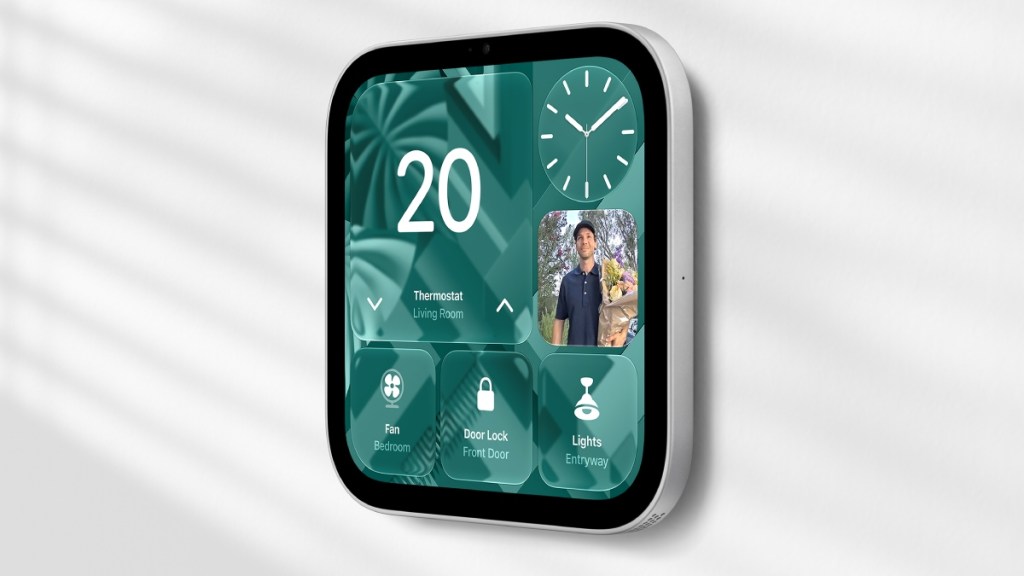

Apple has officially stepped into the smart display arena with the HomeView – a multi-user smart home hub that’s designed to act as the nerve centre for modern connected households. Announced at Apple’s “Welcome Home” event, the device imitates the iMac G4 – something that the rumours kept on insisting. Hence, the HomeView comes in two configurations – a 7-inch Liquid Retina display mounted either on a domed speaker base via a stainless steel hinge, or one with a wall mount.
At Rs 39,900, HomeView is expensive too for a smart home display, if you consider the table-top speaker mount. For those seeking to mount it on the wall, the Apple mount with USB-C costs an additional Rs 6,900. Typical Apple things!
Nonetheless, if you fancy something like a HomeView, Apple has started taking pre-orders, with sales going live on November 13.
But who is the HomeView for? What does it do? What is it good at? We are trying to answer these questions for you.
What is Apple HomeView?
A hybrid hardware-and-software hub that merges a smart speaker, the Apple HomeView is a dedicated Home control panel that also works as a video-calling terminal, and a personal assistant into a single tabletop or wall-mounted display.
At its core, HomeView is powered by the A18 chip and introduces an upgraded Siri AI, deeply integrated with the next generation of Apple Intelligence.
Key technical specifications
Display and Optics: It gets a 7-inch Liquid Retina screen with True Tone, dynamic distance-aware UI scaling, and auto-brightness ranging from 500 nits down to a low 0.3 nits for bedside night mode.
Camera and Audio: The gadget gets a 12MP ultra-wide camera supporting Center Stage for video calls. Tabletop audio features two full-range drivers paired with a down-firing woofer and force-cancelling passive radiators.
Form factors:
Tabletop: Stainless steel tilt hinge on a domed speaker base (available in Silver, Starlight, Rose Pink, and Space Gray).
Wall-Mounted: A flush-mount chassis (available in Silver and Space Gray) built in partnership with Schneider Home for hardwired, USB-C, or Power-over-Ethernet (PoE) setups.
Biometric facial recognition: Supports up to six household members, and automatically keeps switching layouts, calendars, messages, and music recommendations based on who is standing in front of the display.
Ecosystem integration: Works as a native Thread border router and Matter controller, capable of streaming up to nine live security camera feeds simultaneously.
How HomeView works
Unlike Amazon Echo Show or Google Nest Hub, which rely primarily on shared home profiles, HomeView treats a shared household screen as a privacy-first personal dashboard.
When you walk up to HomeView, this is what happens:
On-device identification: Camera and microphone data are processed locally inside Secure Enclaves built directly into the A18 chip.
Dynamic UI adjustment: The display scales based on proximity. From across the room, it displays bold, simplified glanceable information (time, weather, security warnings). As you step closer, it renders richer interactive widgets.
Proximity authentication: Your private Messages, Reminders, and Calendar events only render on-screen when your paired iPhone or iPad is nearby and has been recently unlocked. When guests or unrecognised family members approach, the device defaults to a neutral home view with photo albums, ambient music controls, timers, and smart lighting toggles.
Is Apple HomeView useful for you?
Whether HomeView is worth adding to your living space depends heavily on your current tech setup and daily household routines.
You should get HomeView if:
You running a multi-person Apple household: If your family uses shared Apple Calendars, Reminders, and Apple Music subscriptions, HomeView’s 6-person facial profile system provides a seamless shared-screen experience without compromising individual privacy.
You want a central smart home command center: For homes outfitted with HomeKit or Matter smart lights, door locks, thermostats, and security cameras, having a dedicated 9-camera grid monitor and hands-free touch panel eliminates the need to pull out an iPhone constantly.
You spend a lot of time in the kitchen or bedside: The hands-free multi-timer setup, voice-guided cooking workflows via Siri AI, and down to 0.3-nit auto-dimming make it a good tool for kitchen counters and bedside nightstands.
You should pass if:
You live in a mixed Android/iOS household: Setup and key personal contextual features require a paired, compatible iPhone or iPad. Non-Apple users are restricted to guest functionality.
You already rely on iPad docks: If you routinely leave an iPad docked in the kitchen using StandBy mode, HomeView offers marginal upgrades beyond facial switching and ambient audio hardware.
You reside in the European Union (At Launch): Due to regional rollout schedules for Siri AI and Apple Intelligence features on home hardware, HomeView will not be available in the EU during its initial launch window.