


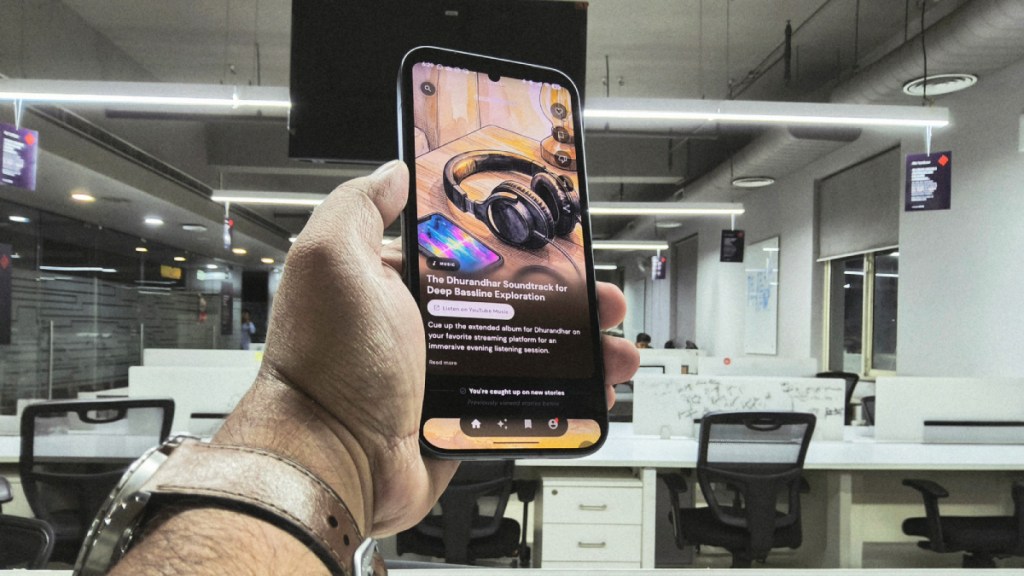

Google Labs has officially rolled out Dreambeans to users across India on both Android and iOS, introducing an AI-powered morning magazine that deliberately comes with an ending.
Described by Google as a “finite story collection,” Dreambeans steps away from engagement traps. Instead of an endless feed, it synthesises personal data across your digital ecosystem into a curated, bite-sized daily digest designed to inform, inspire, and let you get on with your day.
What is Dreambeans?
The idea behind the name reflects how the app functions — it “dreams” overnight—quietly processing context from the Google apps you choose to connect—and distills that information into fresh, bite-sized “beans” or stories delivered each morning.
Rather than acting as a traditional news aggregator, Dreambeans works as an ambient personal concierge.
Cross-App Personal Intelligence: With explicit permissions, Dreambeans connects with your personal Google ecosystem—including Gmail, Calendar, Photos, YouTube, Gemini, and Google Search history.
Hyper-Contextual Daily Drops: The app spots upcoming flights, local cultural exhibitions, DIY hobby ideas from your search habits, or forgotten family recipes, packaging them into illustrated cards.
Custom AI Artwork: Every story is paired with tailored artwork generated on the fly. If a story involves family or personal trips, it can incorporate familiar places and faces using Google Photos face-grouping data rather than generic stock imagery.
Actionable Deep Dives: Tapping a card opens deeper context pulled from the open web—complete with quick one-tap actions like checking reservations, viewing maps, or watching relevant trailers.
Local Language Support: Crucial for the Indian market, Dreambeans debuts with support for 14 languages, including English, Hindi, Bengali, Telugu, Marathi, Tamil, Urdu, Gujarati, Kannada, Malayalam, Odia, Punjabi, Assamese, and Nepali.
How to set up and use Dreambeans on Android, iOS
Dreambeans is available to users aged 18 and older with a personal Google Account.
Step 1: Download and Install
- Android: Open the Google Play Store, search for Dreambeans by Google Labs, and tap Install (requires Android 10 or higher).
- iOS: Open the Apple App Store, search for Dreambeans, and tap Get (requires iOS 17 or higher).
Step 2: Sign in and configure data permissions
- Launch the app and sign in using your personal Google Account (Google Workspace and enterprise accounts are currently not supported).
- Choose your preferred language from the supported regional options.
- Select your connected apps: Dreambeans lets you toggle which services it can read. You must connect at least one app (e.g., YouTube or Calendar), but you can toggle Gmail, Photos, or Search on or off individually depending on your comfort level.
- You can also enable Face Grouping in Google Photos if you want personalised story illustrations featuring familiar faces and frequented spots.
Step 3: Wait for the first overnight brew
Unlike standard apps that immediately populate upon installation, Dreambeans requires up to 24 hours to process your data connections and generate your initial drop. The app will send an alert notification when your first morning collection is ready.
Step 4: Daily browsing and fine-tuning
- Swipe Through Cards: Read your finite set of cards for the day. Once you finish the batch, the app clearly signals that you are caught up.
- Bookmark and Action: Tap on any card to access interactive links, or tap the bookmark icon to save the story into your personal Library for reference later.
- Train the Model: If a suggestion misses the mark, use the thumbs-down button or tap the sparkle (tuning) icon to provide explicit feedback. Corrections are applied to subsequent daily batches.
Privacy and Control
Because Dreambeans accesses intimate data layers across your email, schedule, and media, Google has built in granular privacy limitations:
- Independent Permissions: The data choices made within Dreambeans do not alter your permission settings in Gemini or Google Search AI Mode.
- Data Deletion: You can delete your interaction history, feedback logs, or wipe all Dreambeans data entirely at any time via your in-app profile settings.
- Zero Cross-Contamination: You retain the freedom to disconnect any linked app at will, immediately cutting off future synthesis from that source.